---
url: https://plugin.stripo.email/extensions/changelog.md
---
# Stripo Extensions SDK Change Log
## v3.11.0
### Overview
Version 3.11.0 is a minor release of the Stripo Extensions SDK that introduces an external merge tags library for editor input fields, Element Lock categories for controls, and background template modifications hidden from version history. It also adds new options for blocks, external gallery images, UI elements, and built-in controls.
**Release Date:** 29 September 2026\
**Release Type:** Minor Release\
**Version:** 3.11.0\
**Previous Version:** 3.10.0
:::::tip Editor Compatibility
The npm package version 3.11.0 is fully compatible with the Stripo Editor starting from version **2.79.0 and higher**.
:::::
***
### What's New
#### New: External Merge Tags Library
A new [ExternalMergeTagsLibrary](./reference/integrations/ExternalMergeTagsLibrary) class lets you replace the built-in merge tags picker in the editor's input fields with your own merge tags catalog: text inputs with the merge tag icon, links, image paths, the email Subject, and the Hidden Preheader. The `context` parameter tells whether the library is opened for a `'text'` or a `'link'` field.
```typescript
import { ExtensionBuilder, ExternalMergeTagsLibrary } from '@stripoinc/ui-editor-extensions';
class MyMergeTagsLibrary extends ExternalMergeTagsLibrary {
openMergeTagsLibrary(currentValue, onSelectCallback, onCancelCallback, context) {
// Render your merge tags UI, then call one of the callbacks
onSelectCallback(context.fieldType === 'link' ? '*|PROFILE_URL|*' : '*|FNAME|*');
}
}
const extension = new ExtensionBuilder()
.withExternalMergeTagsLibrary(MyMergeTagsLibrary)
.build();
```
#### New: Element Lock Categories for Controls
The new [ElementLockCategory](./reference/constants/ElementLockCategory) enum and the `getElementLockCategory()` method of [Control](./reference/controls/Control#getelementlockcategory) and built-in controls define which [Lock Element](/editor-configuration/lock-element) option governs a control: "Prevent content editing" (`CONTENT`) or "Prevent style editing" (`STYLE`). The editor disables the controls of a locked element and rejects their patches according to this category.
```typescript
class BackgroundControl extends Control {
getElementLockCategory(): ElementLockCategory {
return ElementLockCategory.STYLE;
}
}
```
Custom controls default to `ElementLockCategory.CONTENT`. Built-in control extensions inherit the category of the extended parent control.
#### New: Background Modifications
[ModificationDescription](./reference/modification/ModificationDescription#ashidden) now supports `asHidden()`. A hidden modification is applied and saved as usual, but it is not shown in the version history, is not a separate undo/redo step, and does not trigger the `onDataChanged` callback.
```typescript
this.api.getDocumentModifier()
.modifyHtml(node)
.setAttribute('data-block-version', '2')
.apply(new ModificationDescription('Migrated block markup').asHidden());
```
#### New: Nested Image Resize Toggle
The [Block](./reference/blocks/Block#isnestedimageresizeenabled) class adds `isNestedImageResizeEnabled()` to hide the on-canvas resize handle of standard image blocks nested inside the block. Images can still be resized through the **Size** control in the settings panel.
```typescript
class MyBlock extends Block {
isNestedImageResizeEnabled(): boolean {
return false;
}
}
```
#### Enhanced: External Gallery Image Properties
[ExternalGalleryImage](./reference/integrations/ExternalImageLibrary#externalgalleryimage) now supports optional `thumbnailUrl` and `customParams` properties. Both are passed through to the [onImageSelected](/editor-configuration/initialization-settings#onimageselected) callback of the editor initialization settings.
```typescript
const image: ExternalGalleryImage = {
originalName: 'product.png',
width: 800,
height: 600,
sizeBytes: 102400,
url: 'https://example.com/product.png',
altText: 'Product image',
thumbnailUrl: 'https://example.com/product_thumb.png', // NEW: Optional preview URL
customParams: { assetId: 'A-1024' } // NEW: Optional custom data
};
```
#### New: Container Border Radius Built-In Control
`ContainerBorderRadiusBuiltInControl` is now exported for container integrations that need to reuse the built-in border radius control. See [Container Block Controls](./components/control#container-block-controls).
***
### Migration Guide
#### From v3.10.0 to v3.11.0
No breaking changes are required for existing extensions.
**Element Lock**: Every custom control now declares its Element Lock category, and the default is `ElementLockCategory.CONTENT` regardless of the tab the control is placed on. Override `getElementLockCategory()` to return `ElementLockCategory.STYLE` for controls that edit visual styling (for example, controls on the Styles tab), so they follow the "Prevent style editing" option of locked elements.
**Background Modifications**: Modifications marked with `asHidden()` do not trigger the `onDataChanged` callback. Do not rely on it to track changes your extension makes this way.
***
## v3.10.0
### Overview
Version 3.10.0 is a minor release of the Stripo Extensions SDK that introduces programmatic access to user permissions, configurable custom font connection methods, new rich text and popup panel UI elements, and explicitly nullable node query return types.
**Release Date:** 27 July 2026\
**Release Type:** Minor Release\
**Version:** 3.10.0\
**Previous Version:** 3.9.0
:::::tip Editor Compatibility
The npm package version 3.10.0 is fully compatible with the Stripo Editor starting from version **2.71.0 and higher**.
:::::
***
### What's New
#### New: User Permissions API
[BaseApi](./reference/api/BaseApi) now exposes the editor's user permissions through `getUserPermissions()` and the `onUserPermissionsUpdated()` subscription. Use the new [EditorPermissions](./reference/types/EditorPermissions) type to adapt extension UI to the current user's access level. See [Permissions and Access Management](/editor-configuration/permissions-and-access-management) for how permissions are configured on your backend.
```typescript
const permissions = this.api.getUserPermissions();
if (!permissions.content?.write) {
this.disableEditingControls();
}
this.api.onUserPermissionsUpdated((newPermissions, oldPermissions) => {
this.refreshControlsState(newPermissions);
});
```
#### Changed: Nullable Node Query Return Types
Several node query methods now explicitly return `undefined` instead of throwing an error when the underlying node or value is missing:
* `ImmutableHtmlTextNode.getTextContent(): string | undefined`
* `ImmutableHtmlElementNode.getValue(): string | undefined`
* `ImmutableHtmlElementNode.getBoundingClientRect(): DOMRect | undefined`
* `ImmutableHtmlElementNode.getDisplayCondition(): DisplayCondition | undefined`
* `ImmutableCssCommentNode.getTextContent(): string | undefined`
***
### Migration Guide
#### From v3.9.0 to v3.10.0
No breaking changes are required for existing extensions at runtime.
**Nullable Return Types**: If your extension is compiled with strict TypeScript settings, add `undefined` handling for the results of `getTextContent()`, `getValue()`, `getBoundingClientRect()`, and `getDisplayCondition()`.
***
## v3.9.0
### Overview
Version 3.9.0 is a minor release of the Stripo Extensions SDK that introduces programmatic access to the editor’s hidden-element state and template theme mode state, along with condition counts for display conditions.
**Release Date:** 29 April 2026\
**Release Type:** Minor Release\
**Version:** 3.9.0\
**Previous Version:** 3.8.0
:::::tip Editor Compatibility
The npm package version 3.9.0 is fully compatible with the Stripo Editor starting from version **2.63.0 and higher**.
:::::
***
### What's New
#### New: Hidden Element State API
[BlockApi](./reference/api/BlockApi) now includes `getHiddenElementState(target)` for reading the editor's canonical hide-on-device state for a node.
```typescript
public onTemplateNodeUpdated(node: ImmutableHtmlNode): void {
const hiddenState = this.api.getHiddenElementState(node);
if (hiddenState === 'mobile') {
this.api.sendEvent('extensions.block.hidden-on-mobile', {
blockId: this.getId(),
});
}
}
```
#### New: `setHiddenElementState()` for HTML Node Modifications
[HtmlNodeModifier](./reference/modification/HtmlNodeModifier) now supports `setHiddenElementState(state)`. Use this to mark the canonical target node (BLOCK, CONTAINER, STRUCTURE, STRIPE) as hidden on desktop or mobile, or pass `undefined` to clear the hidden state.
```typescript
this.api.getDocumentModifier()
.modifyHtml(this.currentNode)
.setHiddenElementState('mobile')
.apply(new ModificationDescription('Hide block on mobile'));
```
#### New: Exported `HideElementState` Type
The SDK now exports [HideElementState](./reference/types/HideElementState), a union type for hidden-element state values:
```typescript
type HideElementState = 'desktop' | 'mobile' | undefined;
```
#### New: Template Theme Mode State
The SDK now exposes the template's active theme through [ThemeMode](./reference/constants/ThemeMode). Use [BaseApi](./reference/api/BaseApi) to read `getEditorState().themeMode`, or subscribe to `EditorStatePropertyType.themeMode` with `onEditorStatePropUpdated()` to react to `ThemeMode.LIGHT` and `ThemeMode.DARK`.
#### Enhanced: Display Condition Metadata
[DisplayCondition](./reference/types/DisplayCondition) now includes optional `conditionsCount` metadata. External display condition integrations can use this value to preserve or display how many individual conditions are represented by a saved condition object.
***
### Migration Guide
#### From v3.8.0 to v3.9.0
No breaking changes are required for existing extensions. Use `getHiddenElementState()` and `setHiddenElementState()` only when you need to synchronize custom controls with the editor's device-specific visibility state.
For theme-aware extension UI, read `themeMode` from `getEditorState()` or subscribe to `EditorStatePropertyType.themeMode`.
***
## v3.8.0
### Overview
Version 3.8.0 is a minor release of the Stripo Extensions SDK that adds editor event dispatching and theme-aware editor state, introduces richer settings panel tab configuration, expands block support for AMP interaction, and adds new UI building blocks for image alignment and AMP-related controls.
**Release Date:** 8 April 2026\
**Release Type:** Minor Release\
**Version:** 3.8.0\
**Previous Version:** 3.7.0
:::::tip Editor Compatibility
The npm package version 3.8.0 is fully compatible with the Stripo Editor starting from version **2.61.0 and higher**.
:::::
***
### What's New
#### New: BaseApi `sendEvent()` for Editor Integrations
All components inheriting from [BaseApi](./reference/api/BaseApi) can now emit fire-and-forget editor events using `sendEvent(type, params)`. Calling `sendEvent()` triggers the editor initialization callback `onEvent(type, params)`, so your host application can react to extension-originated events. See [Initialization Settings](https://plugin.stripo.email/editor-configuration/initialization-settings) for details.
```typescript
this.api.sendEvent('extensions.coupon.opened', {
blockId: this.getId(),
source: 'settings-panel',
});
```
#### Enhanced: SettingsPanelTab Control Configuration
[SettingsPanelTab](./reference/settings-panel/SettingsPanelTab) now supports richer control metadata via `getControls()` and config-based `addControl()` calls. This lets you attach layout-related options such as custom CSS classes and `withFullHeight`.
```typescript
const tab = new SettingsPanelTab('settings', ['title-control'])
.addControl(
{
id: 'advanced-control',
class: 'custom-grid-cell',
withFullHeight: true,
},
1,
);
```
#### New: AMP-Aware Block Interaction Hook
The [Block](./reference/blocks/Block) class adds `allowInteractWithAMPWhenSelected()` so a block can explicitly control whether AMP content remains interactive while the block is selected.
#### New: Additional UI Elements and Attributes
[UIElementType](./reference/constants/UIElementType) now includes:
* `AMP_FORM_SERVICE_PICKER`
* `MULTIPLE_SELECT`
* `SCROLLABLE`
[UEAttr](./reference/constants/UEAttr) also adds attribute mappings for `AMP_FORM_SERVICE_PICKER` and `MULTIPLE_SELECT`, including `placeholder` support for multiple select elements.
#### New: Image Alignment Built-In Control
`ImageAlignmentBuiltInControl` is now exported for image block integrations that need to reuse the built-in alignment control flow.
***
### Migration Guide
#### From v3.7.0 to v3.8.0
**Settings Panel Tabs**: If you need layout metadata for tab controls, switch from string-only `addControl()` calls to the new object form with `id`, `class`, and `withFullHeight`.
***
## v3.7.0
### Overview
Version 3.7.0 is a minor release of the Stripo Extensions SDK that adds Modules Panel Tabs, introduces draggable block UI elements, expands block composition and block panel hooks, and refines lifecycle cleanup support.
**Release Date:** 9 February 2026\
**Release Type:** Minor Release\
**Version:** 3.7.0\
**Previous Version:** 3.6.0
::::tip Editor Compatibility
The npm package version 3.7.0 is fully compatible with the Stripo Editor starting from version **2.56.0 and higher**.
::::
***
### What's New
#### New: Modules Panel Tabs
A new [ModulesPanelTab](./reference/controls/ModulesPanelTab.md) class and [ModulesPanelTabApi](./reference/api/ModulesPanelTabApi.md) allow you to add custom tabs to the Modules panel, with full access to UI element APIs and lifecycle hooks.
```typescript
import { ExtensionBuilder, ModulesPanelTab } from '@stripoinc/ui-editor-extensions';
class MyModulesTab extends ModulesPanelTab {
getId(): string { return 'my-modules-tab'; }
getIcon(): string { return 'my-icon'; }
getName(): string { return 'My Modules'; }
getTabIndex(): number { return 2; }
getTemplate(): string { return '
My modules tab
'; }
}
const extension = new ExtensionBuilder()
.addModulesPanelTab(MyModulesTab)
.build();
```
#### New: Block Hooks for Panel Visibility and Template Styles
The `Block` class now supports:
* `shouldDisplayInBlocksPanel()` to hide a block from the blocks panel while keeping it available elsewhere.
* `getTemplateStyles()` to provide block-specific CSS that is injected when the block is used.
#### New: Draggable Block UI Elements
[UIElementType.DRAGGABLE\_BLOCK](./components/ui-element#draggable-block-ui-element) has been added with `block-id` support in `UIElementsAttributes`, enabling UI elements that bind to a specific block ID for drag-and-drop scenarios.
#### New: Stripe Block Composition Type
`BlockCompositionType.STRIPE` has been added to support stripe-level composition patterns.
#### Enhanced: Lifecycle Cleanup Hook
`BaseValidatedClass` introduces a `destroy()` method so extensions can clean up resources when the editor is reinitialized or the extension is uninstalled.
***
### Breaking Changes
#### 1. Text Link Color Built-In Control Removed
The `TextLinkColorBuiltInControl` and `BuiltInControlTypes.TextControls.LINKS_COLOR` have been removed, along with the `text-link-color` control implementation.
***
### Migration Guide
#### From v3.6.0 to v3.7.0
**Use Text Color Built-In Control**: Replace `TextLinkColorBuiltInControl` with `TextColorBuiltInControl` and update references from `BuiltInControlTypes.TextControls.LINKS_COLOR` to `BuiltInControlTypes.TextControls.TEXT_COLOR`.
***
## v3.6.0
### Overview
Version 3.6.0 is a minor release of the Stripo Extensions SDK that expands editor APIs for display conditions and tab titles, adds module lookup helpers, and refines node query return types.
**Release Date:** 15 January 2026\
**Release Type:** Minor Release\
**Version:** 3.6.0\
**Previous Version:** 3.5.0
::::tip Editor Compatibility
The npm package version 3.6.0 is fully compatible with the Stripo Editor starting from version **2.53.0 and higher**.
::::
***
### What's New
#### New: External Display Conditions API Access
The `ExternalDisplayConditionsLibrary` now exposes an `api` property of type `ExternalDisplayConditionsApi` for editor integrations.
#### New: Settings Panel Tab Title HTML
The `ControlApi` now includes `setSettingsPanelTabTitleHtml()` to update a settings panel tab title with custom HTML.
```typescript
this.api.setSettingsPanelTabTitleHtml('my-tab', ' My Tab');
```
#### New: Blocks Panel Placement Toggle
The `BlocksPanel` class adds `isPanelPlacementChangeEnabled()` to control whether the modules panel shows the drag handle for reordering.
```typescript
class MyBlocksPanel extends BlocksPanel {
isPanelPlacementChangeEnabled(): boolean {
return false;
}
}
```
#### New: Module Lookup Helpers
`ImmutableHtmlNode` now supports module discovery helpers for finding module elements in the document tree:
```typescript
const modules = node.getModuleElements();
const moduleById = node.getModuleElementsById(123);
```
***
### Breaking Changes
#### 1. Typo Fix: `getClosetModuleElement()` Renamed
The method `getClosetModuleElement()` has been renamed to `getClosestModuleElement()`.
***
### Migration Guide
#### From v3.5.0 to v3.6.0
**Rename Method**: Replace `getClosetModuleElement()` with `getClosestModuleElement()`.
***
## v3.5.0
### Overview
Version 3.5.0 is a minor release of the Stripo Extensions SDK that introduces the General Panel Tab for custom editor extensions, support for repeatable UI elements, and architectural improvements.
**Release Date:** 19 December 2025\
**Release Type:** Minor Release\
**Version:** 3.5.0\
**Previous Version:** 3.4.0
:::tip Editor Compatibility
The npm package version 3.5.0 is fully compatible with the Stripo Editor starting from version **2.49.1 and higher**.
:::
***
### What's New
#### New: General Panel Tab
A new `GeneralPanelTab` class has been introduced to allow developers to add custom tabs to the "General" panel of the editor. This is ideal for global extension settings or tools that are not specific to a single block.
```typescript
import { GeneralPanelTab, ExtensionBuilder } from '@stripoinc/ui-editor-extensions';
class MyGlobalTab extends GeneralPanelTab {
getId(): string { return 'my-global-tab'; }
getIcon(): string { return 'my-icon'; }
getName(): string { return 'My Tool'; }
getTabIndex(): number { return 1; }
getTemplate(): string { return '
My custom tool content
'; }
}
// Register in ExtensionBuilder
const extension = new ExtensionBuilder()
.addGeneralPanelTab(MyGlobalTab)
.build();
```
#### New: Repeatable UI Elements
Introduced `UIElementType.REPEATABLE` for creating lists of items within controls. This allows for dynamic lists of sub-elements that can be managed within a single control.
#### New: Block Settings Panel Title with HTML Support
The `Block` class now includes a `getSettingsPanelTitleHtml()` method that allows you to customize the settings panel title with HTML content.
```typescript
import { Block } from '@stripoinc/ui-editor-extensions';
class MyBlock extends Block {
// ... other methods
getSettingsPanelTitleHtml(): string {
return ' My Custom Block';
}
}
```
#### Enhanced: Control API with Repeatable Support
The `ControlApi` has been enhanced with `updateUIElementValue()` to support granular updates, including items within repeatable elements using path notation.
```typescript
// Update a specific field in a repeatable list
this.api.updateUIElementValue('items[0].title', 'New Title');
```
The `onValueChanged` callback now also receives an optional `index` parameter when the change occurs within a repeatable element.
```typescript
this.api.onValueChanged('items.title', (newValue, oldValue, index) => {
console.log(`Item at index ${index} changed from ${oldValue} to ${newValue}`);
});
```
***
### Breaking Changes
#### 1. ContextActionType: Removed Items
The following constants have been removed from `ContextActionType`:
* `UPDATE_MODULE`
* `REMOVE_CONTAINER`
***
### Migration Guide
#### From v3.4.0 to v3.5.0
**Context Actions**: If you were using `ContextActionType.UPDATE_MODULE` or `ContextActionType.REMOVE_CONTAINER`, please update your implementation as these are no longer supported.
***
## v3.4.0
### Overview
Version 3.4.0 is a minor release of the Stripo Extensions SDK that enhances the External Image Library Tab with contextual node information. This release maintains full backward compatibility with v3.3.0.
**Release Date:** 12 December 2025\
**Release Type:** Minor Release\
**Version:** 3.4.0\
**Previous Version:** 3.3.0
:::tip Editor Compatibility
The npm package version 3.4.0 is fully compatible with the Stripo Editor starting from version **2.48.0 and higher**.
:::
***
### What's New
#### Enhanced: ExternalImageLibraryTab with Node Context
The `ExternalImageLibraryTab` class has been enhanced to provide contextual information about the selected node when opening the image library. The `openImageLibraryTab()` method now receives an optional `selectedNode` parameter.
```typescript
import { ExternalImageLibraryTab, ExternalGalleryImageSelectCallback, ImmutableHtmlNode } from '@stripoinc/ui-editor-extensions';
class MyCustomImageTab extends ExternalImageLibraryTab {
getName(): string {
return 'My Images';
}
// Old (v3.3.0)
// openImageLibraryTab(
// container: HTMLElement,
// onImageSelectCallback: ExternalGalleryImageSelectCallback
// ): void { ... }
// New (v3.4.0) - with optional selectedNode parameter
openImageLibraryTab(
container: HTMLElement,
onImageSelectCallback: ExternalGalleryImageSelectCallback,
selectedNode?: ImmutableHtmlNode // NEW: Optional node context
): void {
// Access information about the selected node
if (selectedNode) {
const nodeId = selectedNode.getAttribute('id');
console.log('Image library opened for node:', nodeId);
// Use node context to customize image library behavior
}
// Render your custom image library UI in the container
container.innerHTML = `
`;
}
}
```
**Use Cases:**
* Filter or customize image suggestions based on the selected node type
* Apply node-specific image constraints (size, format, etc.)
* Provide contextual image recommendations based on node attributes
**Backward Compatibility:**
* The `selectedNode` parameter is optional, so existing implementations continue to work without modifications
* You can gradually adopt this feature when needed
***
### Migration Guide
#### From v3.3.0 to v3.4.0
**No Breaking Changes** - Version 3.4.0 is fully backward compatible with v3.3.0. All existing code will continue to work without modifications.
**Optional Enhancement** - If you want to take advantage of node context in your custom image library tabs, you can add the optional `selectedNode` parameter to your `openImageLibraryTab()` method implementation.
***
## v3.3.0
### Overview
Version 3.3.0 is a minor release of the Stripo Extensions SDK that introduces enhanced node query methods. This release maintains full backward compatibility with v3.2.0.
**Release Date:** 28 November 2025\
**Release Type:** Minor Release\
**Version:** 3.3.0\
**Previous Version:** 3.2.0
:::tip Editor Compatibility
The npm package version 3.3.0 is fully compatible with the Stripo Editor starting from version **2.46.0 and higher**.
:::
***
### What's New
#### New: Module Element Query Method
The `BaseImmutableNode` interface now includes a method `getClosetModuleElement()` to retrieve the closest module element directly.
```typescript
import { ImmutableHtmlNode } from '@stripoinc/ui-editor-extensions';
// In your block or control
const moduleId = node.getClosestModuleId();
console.log('Closest module ID:', moduleId);
// NEW in v3.3.0 - Get the module element itself
const moduleElement = node.getClosetModuleElement();
if (moduleElement) {
console.log('Module element found:', moduleElement.getTagName());
// Perform operations on the module element
}
```
**Use Cases:**
* Direct access to module element for modification
* Inspecting module structure and attributes
**Difference from `getClosestModuleId()`:**
* `getClosestModuleId()`: Returns the numeric ID of the closest module
* `getClosetModuleElement()`: Returns the actual ImmutableNode element of the module, or `undefined` if not found
***
### Migration Guide
#### From v3.2.0 to v3.3.0
**No Breaking Changes** - Version 3.3.0 is fully backward compatible with v3.2.0. All existing code will continue to work without modifications.
***
## v3.2.0
### Overview
Version 3.2.0 is a minor release of the Stripo Extensions SDK that introduces support for a custom image library tab and enhanced image metadata capabilities. This release maintains full backward compatibility with v3.1.0.
**Release Date:** 09 November 2025\
**Release Type:** Minor Release\
**Version:** 3.2.0\
**Previous Version:** 3.1.0
:::tip Editor Compatibility
The npm package version 3.2.0 is fully compatible with the Stripo Editor starting from version **2.43.0 and higher**.
:::
***
### What's New
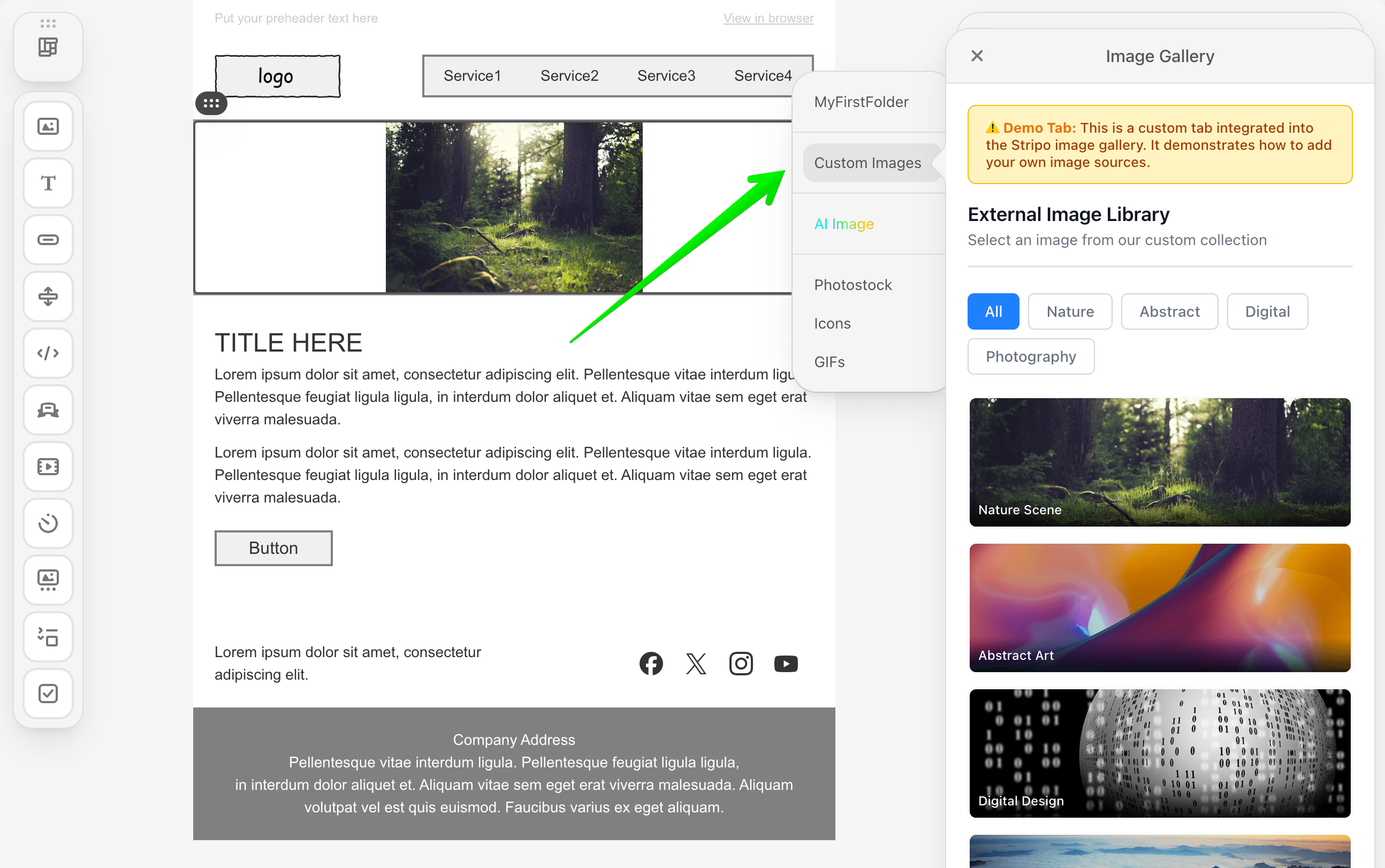
#### New: ExternalImageLibraryTab Class
A new class has been introduced to enable developers to create a custom tab within the build-in Stripo image library. This allows you to organize images from different sources into a separate tab for better user experience.
::: image-wrap
:::
```typescript
import { ExternalImageLibraryTab, ExternalGalleryImageSelectCallback } from '@stripoinc/ui-editor-extensions';
class MyCustomImageTab extends ExternalImageLibraryTab {
/**
* Returns the translated name/label for the tab
*/
getName(): string {
return 'My Images';
}
/**
* Opens the custom tab and renders your image library UI
* @param container - DOM element where you should render your UI
* @param onImageSelectCallback - Callback to invoke when user selects an image
*/
openImageLibraryTab(
container: HTMLElement,
onImageSelectCallback: ExternalGalleryImageSelectCallback
): void {
// Render your custom image library UI in the container
container.innerHTML = `
`;
// When user selects an image, call the callback
// onImageSelectCallback(imageData);
}
}
// Register in ExtensionBuilder
const extension = new ExtensionBuilder()
.withExternalImageLibraryTab(MyCustomImageTab)
.build();
```
**Full Example Implementation:** [How to Integrate an External Image Library Tab](./tutorials/examples/integrations/external-image-library-tab.md)
***
#### Enhanced: ExternalGalleryImage Interface
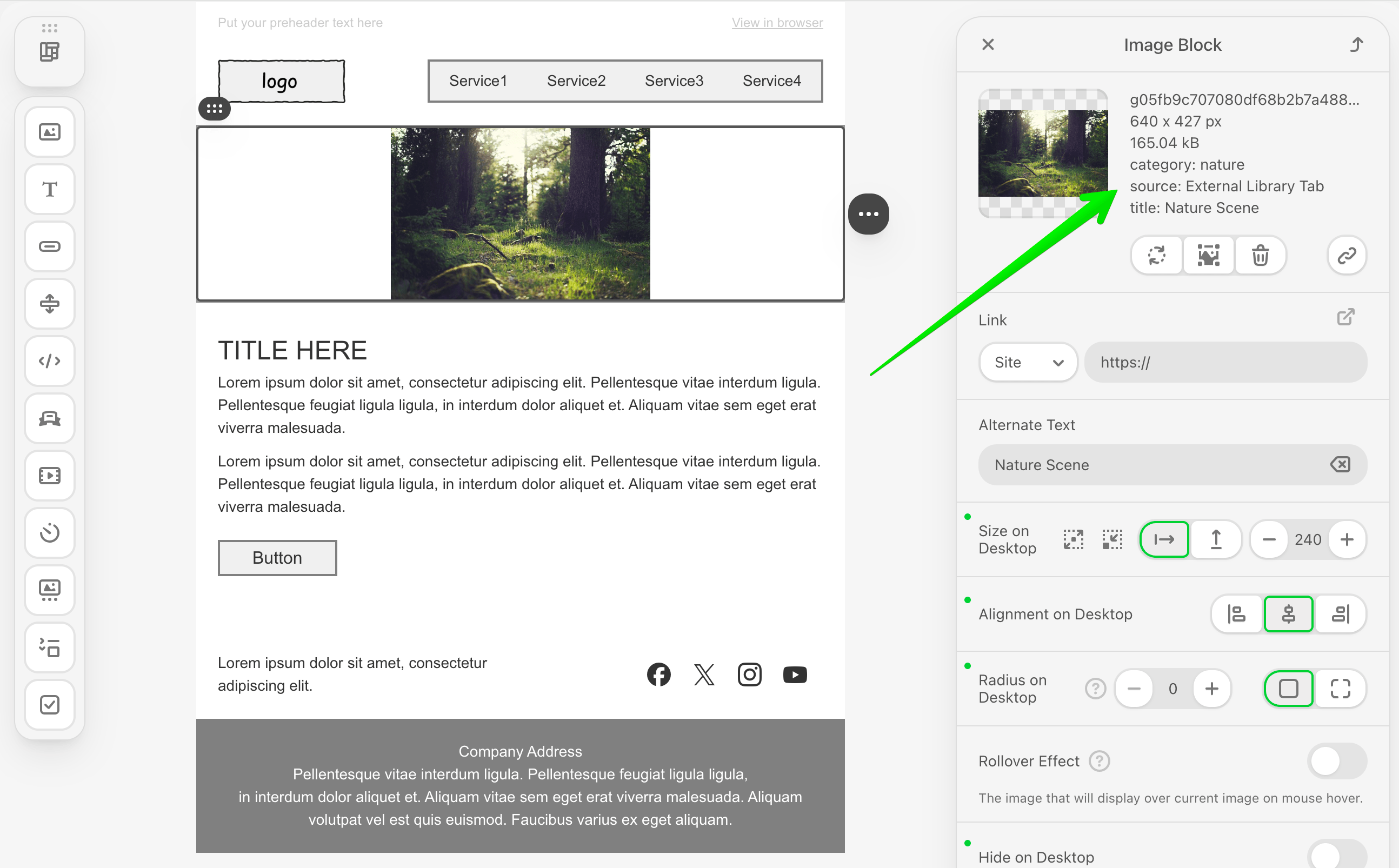
The `ExternalGalleryImage` interface now supports optional metadata labels for additional image information:
::: image-wrap
:::
```typescript
import { ExternalGalleryImage } from '@stripoinc/ui-editor-extensions';
// Old (v3.1.0)
const image: ExternalGalleryImage = {
originalName: 'product.png',
width: 800,
height: 600,
sizeBytes: 102400,
url: 'https://example.com/product.png',
altText: 'Product image'
};
// New (v3.2.0) - with optional labels
const image: ExternalGalleryImage = {
originalName: 'product.png',
width: 800,
height: 600,
sizeBytes: 102400,
url: 'https://example.com/product.png',
altText: 'Product image',
labels: { // NEW: Optional metadata
category: 'Products',
photographer: 'John Doe',
license: 'Commercial',
tags: 'red, clothing, winter'
}
};
```
***
### Migration Guide
#### From v3.1.0 to v3.2.0
**No Breaking Changes** - Version 3.2.0 is fully backward compatible with v3.1.0. All existing code will continue to work without modifications.
## v3.1.0
### Overview
Version 3.1.0 is a minor release of the Stripo Extensions SDK that introduces new UI elements for creating orderable/sortable lists, enhanced control lifecycle hooks, and additional node query capabilities. This release maintains full backward compatibility with v3.0.0.
**Release Date:** 03 November 2025\
**Release Type:** Minor Release\
**Version:** 3.1.0\
**Previous Version:** 3.0.0
:::tip Editor Compatibility
The npm package version 3.1.0 is fully compatible with the Stripo Editor starting from version **2.42.0 and higher**.
:::
***
### What's New
#### New: Orderable UI Element
A new UI element has been introduced to create orderable/sortable lists within your custom controls. These elements enable users to reorder items through drag-and-drop or positioning controls.
```typescript
import { UIElementType } from '@stripoinc/ui-editor-extensions';
// Available orderable element types
UIElementType.ORDERABLE // 'UE-ORDERABLE' - Container for orderable items
UIElementType.ORDERABLE_ITEM // 'UE-ORDERABLE-ITEM' - Individual orderable item
UIElementType.ORDERABLE_ICON // 'UE-ORDERABLE-ICON' - Icon for ordering controls
```
***
#### New: Control `onDocumentChanged()` Lifecycle Hook
Controls now have access to a new lifecycle hook that is called whenever any part of the document template changes.
```typescript
import { Control, ImmutableHtmlNode } from '@stripoinc/ui-editor-extensions';
class MyControl extends Control {
getId(): string { return 'my-control'; }
getTemplate(): string { return '
...
'; }
/**
* NEW in v3.1.0
* Called when any part of the document template has changed
* @param node - The immutable HTML node representing current node instance
*/
onDocumentChanged(node: ImmutableHtmlNode): void {
// React to document-wide changes
// This can be frequent; use cautiously for performance-sensitive operations
const customValue = node.getAttribute('data-custom');
if (customValue) {
// Update control state based on document changes
}
}
}
```
**Important Notes:**
* This hook can be called frequently during editing
* Use cautiously for performance-sensitive operations
* Receives the current node instance as a parameter
* Useful for controls that need to react to global template changes
**Difference from `onTemplateNodeUpdated()`:**
* `onTemplateNodeUpdated()`: Called when the node associated with this control's context is updated
* `onDocumentChanged()`: Called when any part of the document template changes
***
#### New: Node Module Identification
The `BaseImmutableNode` interface now includes a method to retrieve the closest module ID associated with a node.
```typescript
import { ImmutableHtmlNode } from '@stripoinc/ui-editor-extensions';
// In your block or control
const moduleId = node.getClosestModuleId();
console.log('Closest module ID:', moduleId);
```
**Use Cases:**
* Identifying which module a node belongs to
* Module-specific operations and logic
**Example Implementation:**
The [External Merge Tags Selector](/extensions/tutorials/examples/integrations/external-merge-tags-selector) tutorial demonstrates practical usage of `getClosestModuleId()` for detecting module context and displaying contextual UI indicators.
***
### Migration Guide
#### From v3.0.0 to v3.1.0
**No Breaking Changes** - Version 3.1.0 is fully backward compatible with v3.0.0. All existing code will continue to work without modifications.
## v3.0.0
### Overview
Version 3.0.0 is a major release of the Stripo Extensions SDK that introduces significant architectural improvements, enhanced TypeScript support, and new features for extending the Stripo email editor. This release includes breaking changes that require migration from v2.x.
**Release Date:** 20 October 2025\
**Release Type:** Major Release\
**Version:** 3.0.0\
**Previous Version:** 2.0.2
:::tip Editor Compatibility
The npm package version 3.0.0 is fully compatible with the Stripo Editor starting from version **2.40.0 and higher**.
:::
***
### What's New
#### Enhanced Package Distribution
The SDK now supports multiple module formats for better compatibility across different JavaScript environments:
* **ESM (ECMAScript Modules)**: Modern ES module format
* **CJS (CommonJS)**: Node.js compatible format
* **Browser Bundle**: Optimized browser-ready bundle
```json
{
"exports": {
".": {
"types": "./dist/types/index.d.ts",
"import": "./dist/esm/index.js",
"require": "./dist/cjs/index.cjs",
"default": "./dist/esm/index.js"
},
"./browser": {
"browser": "./dist/browser/index.js",
"default": "./dist/browser/index.js"
}
}
}
```
**Migration:** No code changes required. The package will automatically use the appropriate format for your environment.
***
#### New: Icons Registry
A new `IconsRegistry` class enables [registration](/extensions/features/icons-management) of custom SVG icons for use throughout your extensions.
```typescript
import { IconsRegistry } from '@stripoinc/ui-editor-extensions';
class MyIconsRegistry extends IconsRegistry {
registerIconsSvg(iconsMap: Record): void {
iconsMap['custom-icon'] = '';
iconsMap['another-icon'] = '';
}
}
// Register in ExtensionBuilder
const extension = new ExtensionBuilder()
.setIconsRegistry(MyIconsRegistry)
.build();
```
**Benefits:**
* Centralized icon management
* SVG support for crisp, scalable icons
* Easy to share icons across multiple components
***
#### New: Control Visibility Management
Controls can now be dynamically shown or hidden based on the selected node's state.
```typescript
import { Control } from '@stripoinc/ui-editor-extensions';
class MyControl extends Control {
// New method - implement to control visibility
isVisible(node: ImmutableHtmlNode): boolean {
// Show control only for specific block types
return node.hasClass('my-custom-block');
}
getId(): string { return 'my-control'; }
getTemplate(): string { return '
...
'; }
}
```
**Use Cases:**
* Show controls only for specific block types
* Hide controls based on user permissions
* Conditional UI based on template state
***
#### New: Additional Built-in Controls Available
Pre-built visibility controls are now available for major block types:
* `StructureVisibilityBuiltInControl`
* `ContainerVisibilityBuiltInControl`
* `ImageVisibilityBuiltInControl`
* `ButtonVisibilityBuiltInControl`
* `TextVisibilityBuiltInControl`
New typography and styling controls for button blocks:
* `ButtonFontFamilyBuiltInControl` - Font family selection for buttons
* `ButtonTextSizeBuiltInControl` - Button text size control
* `ButtonTextStyleAndFontColorBuiltInControl` - Combined text style and color control
New background and border controls:
* `ContainerBackgroundImageBuiltInControl` - Set background images on containers
* `ContainerBorderBuiltInControl` - Container border styling
* `StructureBackgroundImageBuiltInControl` - Structure background images
***
#### New BlocksPanel Customization
[Customize](/extensions/reference/blocks/BlocksPanel#getmodulestabiconname) the modules tab icon in the blocks panel:
```typescript
import { BlocksPanel } from '@stripoinc/ui-editor-extensions';
class MyBlocksPanel extends BlocksPanel {
getModulesTabIconName(modulesTab: {
key: string;
label: Record
}): string | undefined {
return 'custom-modules-icon'; // Use registered icon
}
}
```
***
### Breaking Changes
#### 1. Class Architecture: Abstract Classes Replaced with Validated Classes
**BREAKING CHANGE:** All extension base classes have been refactored from TypeScript abstract classes to regular classes with runtime validation.
##### Affected Classes
* `Block`
* `Control`
* `UIElement`
* `ContextAction`
##### Old Implementation (v2.x)
```typescript
import { Block } from '@stripoinc/ui-editor-extensions';
export class MyBlock extends Block {
// TypeScript enforced abstract method implementation
abstract getId(): string;
abstract getTemplate(): string;
abstract getIcon(): string;
abstract getName(): string;
abstract getDescription(): string;
}
```
##### New Implementation (v3.0)
```typescript
import { Block } from '@stripoinc/ui-editor-extensions';
export class MyBlock extends Block {
constructor() {
super(); // Now calls BaseValidatedClass constructor
}
// Methods now throw errors if not implemented
getId(): string { return 'my-block'; }
getTemplate(): string { return '
...
'; }
getIcon(): string { return 'icon.svg'; }
getName(): string { return 'My Block'; }
getDescription(): string { return 'Description'; }
}
```
**Why This Change?**
* Improved runtime validation with clearer error messages
* Better developer experience with validation logging
**Migration Steps:**
1. If your class defines a `constructor()`, ensure you call `super()` inside it
2. Ensure all required methods are implemented (validation will catch missing methods at runtime)
3. Test your extension - you'll see helpful error messages if methods are missing
***
#### 2. Block Lifecycle Hooks: Signature Changes
**BREAKING CHANGE:** Several `Block` lifecycle hooks have changed their signatures.
##### `onDocumentInit()` - Return Type Removed
**Old (v2.x):**
```typescript
onDocumentInit(): HtmlNodeModifier | undefined {
const modifier = this.api.getDocumentModifier();
// Make modifications
return modifier;
}
```
**New (v3.0):**
```typescript
onDocumentInit(): void {
const modifier = this.api.getDocumentModifier();
// Make modifications and apply them
modifier.apply(new ModificationDescription(`Some modifications applied`))
// No return value needed
}
```
**Migration:** Remove the return statement and apply migrations with the appropriate description manually.
***
##### `onSelect()` - Return Type Removed
**Old (v2.x):**
```typescript
onSelect(node: ImmutableHtmlNode): HtmlNodeModifier | undefined {
const modifier = this.api.getDocumentModifier();
// Make modifications
return modifier;
}
```
**New (v3.0):**
```typescript
onSelect(node: ImmutableHtmlNode): void {
const modifier = this.api.getDocumentModifier();
// Make modifications and apply them
modifier.apply(new ModificationDescription(`Some modifications applied`))
// No return value needed
}
```
**Migration:** Remove the return statement and apply migrations with the appropriate description manually.
***
##### `onCopy()` - Parameters and Return Type Changed
**Old (v2.x):**
```typescript
onCopy(
targetNode: ImmutableHtmlNode,
sourceNode: ImmutableHtmlNode
): HtmlNodeModifier | undefined {
const modifier = this.api.getDocumentModifier();
// Modify the copied node
return modifier;
}
```
**New (v3.0):**
```typescript
onCopy(modifier: HtmlNodeModifier): void {
// Use the provided modifier directly
// Modifier is already set up for the copy operation
modifier.setAttribute('data-copied', 'true');
// No return value
}
```
**Migration:**
1. Change method signature to accept `modifier: HtmlNodeModifier`
2. Use the provided modifier parameter directly
3. Remove return statement
4. Your modifications will now be applied directly within the copy operation.
***
##### `onDelete()` - Return Type Removed
**Old (v2.x):**
```typescript
onDelete(node: ImmutableHtmlNode): HtmlNodeModifier | undefined {
const modifier = this.api.getDocumentModifier();
// Make modifications
return modifier;
}
```
**New (v3.0):**
```typescript
onDelete(node: ImmutableHtmlNode): void {
const modifier = this.api.getDocumentModifier();
// Make modifications and apply them
modifier.apply(new ModificationDescription(`Some modifications applied`))
// No return value needed
}
```
**Migration:** Remove the return statement and apply migrations with the appropriate description manually.
***
##### `onDocumentChanged()` - Now Receives Node Parameter
**Old (v2.x):**
```typescript
onDocumentChanged(): void {
// React to any document changes
// No context about which node changed
}
```
**New (v3.0):**
```typescript
onDocumentChanged(node: ImmutableHtmlNode): void {
// React to document changes for this specific node
// The node parameter indicates which extension instance triggered the event
// For example, if you have multiple instances of a custom block (such as Coupon block), this hook will be called separately for each node, allowing you to distinguish between them (e.g., Coupon block 1 and Coupon block 2)
if (node.getAttribute('data-custom') === 'value') {
// Handle specific node changes
}
}
```
**Migration:** Add the `node: ImmutableHtmlNode` parameter to your method signature.
***
#### 3. Control Class: `onTemplateNodeUpdated()` Now Optional
**BREAKING CHANGE:** The `onTemplateNodeUpdated()` method is now optional with a default no-op implementation.
**Old (v2.x):**
```typescript
import { Control } from '@stripoinc/ui-editor-extensions';
class MyControl extends Control {
abstract onTemplateNodeUpdated(node: ImmutableHtmlNode): void;
// HAD to implement this method
onTemplateNodeUpdated(node: ImmutableHtmlNode): void {
// Update UI based on node changes
}
}
```
**New (v3.0):**
```typescript
import { Control } from '@stripoinc/ui-editor-extensions';
class MyControl extends Control {
// Now optional - only implement if needed
onTemplateNodeUpdated(node: ImmutableHtmlNode): void {
// Update UI based on node changes
}
// Or omit entirely if you don't need it
}
```
**Migration:** No changes required if you're already implementing this method. If you had empty implementations, you can remove them.
***
#### 4. ContextAction: Method Renamed
**BREAKING CHANGE:** The `getIconClass()` method has been renamed to `getIcon()`.
**Old (v2.x):**
```typescript
import { ContextAction } from '@stripoinc/ui-editor-extensions';
class MyAction extends ContextAction {
getIconClass(): string {
return 'custom-icon';
}
}
```
**New (v3.0):**
```typescript
import { ContextAction } from '@stripoinc/ui-editor-extensions';
class MyAction extends ContextAction {
getIcon(): string {
return 'custom-icon'; // Icon name from IconsRegistry
}
}
```
**Migration:**
1. Rename `getIconClass()` to `getIcon()`
***
#### 5. Built-in Control Renames
**BREAKING CHANGE:** Several built-in controls have been renamed for clarity and consistency.
#### Font Family Controls
**Old (v2.x):**
```typescript
import {
FontFamilyBuiltInControl, // Text font control
LinkColorBuiltInControl, // Text Link color
ButtonFontColorBuiltInControl, // Button font color
BackgroundImageBuiltInControl // Generic background
} from '@stripoinc/ui-editor-extensions';
```
**New (v3.0):**
```typescript
import {
TextFontFamilyBuiltInControl, // Renamed from FontFamilyBuiltInControl
TextLinkColorBuiltInControl, // Renamed from LinkColorBuiltInControl
ButtonFontFamilyBuiltInControl, // New - button specific
// BackgroundImageBuiltInControl - REMOVED, use specific controls below
ContainerBackgroundImageBuiltInControl, // Container specific
StructureBackgroundImageBuiltInControl // Structure specific
} from '@stripoinc/ui-editor-extensions';
```
**Migration Table:**
| Old Name (v2.x) | New Name (v3.0) | Notes |
|----------------|----------------|-------|
| `FontFamilyBuiltInControl` | `TextFontFamilyBuiltInControl` | Renamed for clarity |
| `LinkColorBuiltInControl` | `TextLinkColorBuiltInControl` | Renamed for clarity |
| `ButtonFontColorBuiltInControl` | `ButtonTextStyleAndFontColorBuiltInControl` | Enhanced functionality |
| `BackgroundImageBuiltInControl` | Use `ContainerBackgroundImageBuiltInControl` or `StructureBackgroundImageBuiltInControl` | Removed - use specific controls |
***
### Extension Class Changes
#### New: `iconsRegistry` Support
The `Extension` class now supports icon registry configuration.
**Old (v2.x):**
```typescript
const extension = new ExtensionBuilder()
.setI18n(translations)
.setStyles(styles)
.addBlock(MyBlock)
.build();
```
**New (v3.0):**
```typescript
const extension = new ExtensionBuilder()
.setI18n(translations)
.setStyles(styles)
.setIconsRegistry(MyIconsRegistry) // NEW
.addBlock(MyBlock)
.build();
```
The `Extension` class now has:
* `getIconsRegistry(): ConstructorOfType | undefined` - NEW method
**Migration:** No changes required unless you want to use the new IconsRegistry feature.